


Why Your Site Still Serves the Old TLS Certificate After Renewal
A certificate renewal at portal.example.com succeeds overnight. The next morning, one visitor sees the new expiry date and another still gets an expired-certificate warning. Both are using the same URL. The ordinary renewal check is green, and Nginx is already serving the new certificate when queried directly. That narrows the investigation to a question the renewal log cannot answer: which endpoint handled the failing TLS connection?
In this example, two public addresses terminate TLS at the edge, and the edge opens a separate HTTPS connection to Nginx. An administrator can reach the origin on a management network. Each TLS connection has its own handshake, so the origin and the public endpoints can legitimately use different certificates.
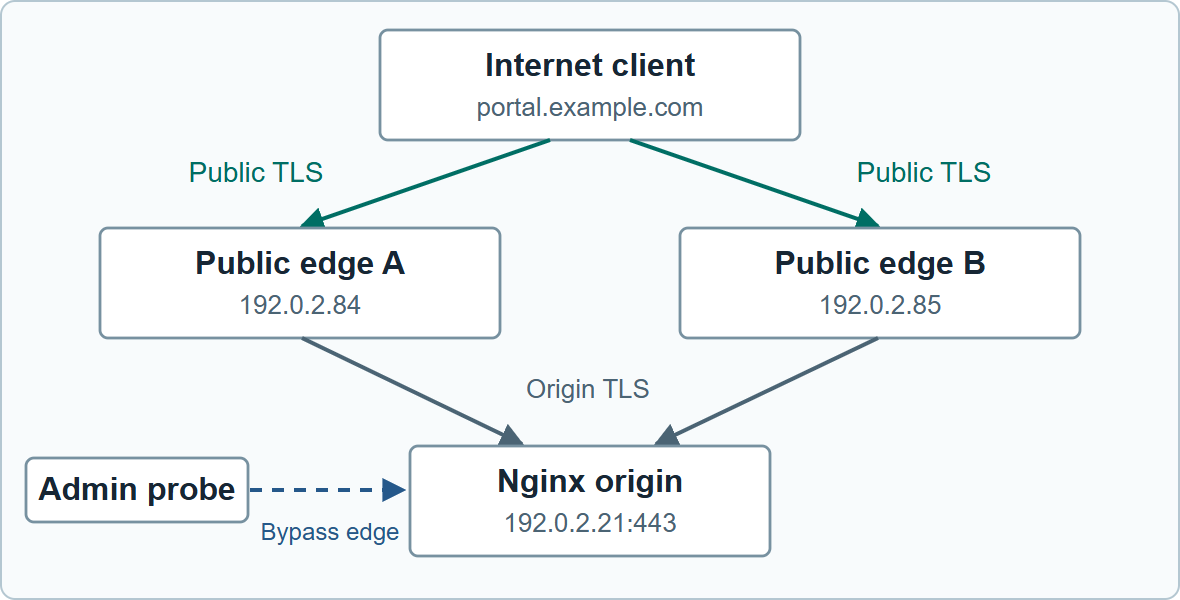
Ask each endpoint for its certificate
Resolve the hostname first. A probe against the hostname alone can land on the healthy endpoint every time, especially if DNS returns a preferred order or your connection is being routed locally. The example uses documentation addresses. Substitute your own addresses and run the origin check from a network where origin access is already permitted.
dig +short A portal.example.com
dig +short AAAA portal.example.com

probe() {
  openssl s_client -connect "$1" -servername portal.example.com \
    </dev/null 2>/dev/null |
    openssl x509 -noout -issuer -serial -enddate
}

probe 192.0.2.84:443
probe 192.0.2.85:443
probe 192.0.2.21:443
Keep -servername even when connecting to an IP. It sends the expected hostname in the ClientHello so a shared listener can select the right virtual host. For IPv6, pass the address in brackets, for example probe '[2001:db8::84]:443'. If a probe prints no certificate, rerun s_client without hiding stderr to see the connection or handshake error.
192.0.2.84  public edge       serial=4A18  notAfter=Dec 19 02:00:00 2024 GMT
192.0.2.85  public edge       serial=5B29  notAfter=Mar 18 02:00:00 2025 GMT
192.0.2.21  Nginx origin      serial=7C30  notAfter=Mar 16 02:00:00 2025 GMT
These are illustrative results. One public address is still presenting the expired leaf, its peer is healthy, and the origin certificate is current. In this case, inspect the certificate binding on the listener serving 192.0.2.84. Check the hostname as well as the certificate object. Uploading a new certificate can leave an existing listener pointed at the old object, and a configuration rollout can update one endpoint ahead of another. On an anycast service, repeat the probe from the affected location or use the provider’s endpoint diagnostics. One address can represent several points of presence.
When the origin itself is stale
Compare the origin handshake with the leaf in the file referenced by the effective Nginx configuration. If the file is already current, confirm which process owns the listener, test the configuration, then inspect the result of a reload. If the file is old, correct the renewal client’s installation destination before reloading. Issued files and deployed files often live at different paths.
sudo nginx -T
sudo openssl x509 -in /etc/nginx/tls/portal.example.com/fullchain.pem \
  -noout -issuer -serial -enddate
sudo nginx -t
sudo systemctl reload nginx
Configuration validation must pass before the reload. On setups using acme.sh, keep the deployment paths and reload hook together so later renewals follow the same route. Use the certificate file for the openssl x509 check and keep the private key out of any diagnostic output you share.
Confirm the fix from outside
Recheck every published endpoint against the certificate intended for that listener. Then run a normal HTTPS request with hostname and chain validation enabled. For the example public edge, curl --resolve portal.example.com:443:192.0.2.84 https://portal.example.com/ tests the affected address without changing DNS. Repeat with the second address and from an affected client network if available. Keep expiry monitoring on the public handshake. Monitoring only the origin’s certificate file would have stayed green throughout this failure.