


Tracing an InfiniBand Path from LID to Switch Port
H2 was moved during a rack change. When it comes back, a workload on H1 can no longer open an RDMA connection to it. Both hosts report an active InfiniBand port. The useful question is where a packet for H2 is supposed to leave each switch, then whether those ports actually lead to H2.
This lab uses one native InfiniBand subnet. H1 has LID 11 on HCA port 1. H2 has LID 24 on its port 1. H1 connects to S1 port 2, the switches meet at S1 port 7 and S2 port 12, and H2 connects to S2 port 4.
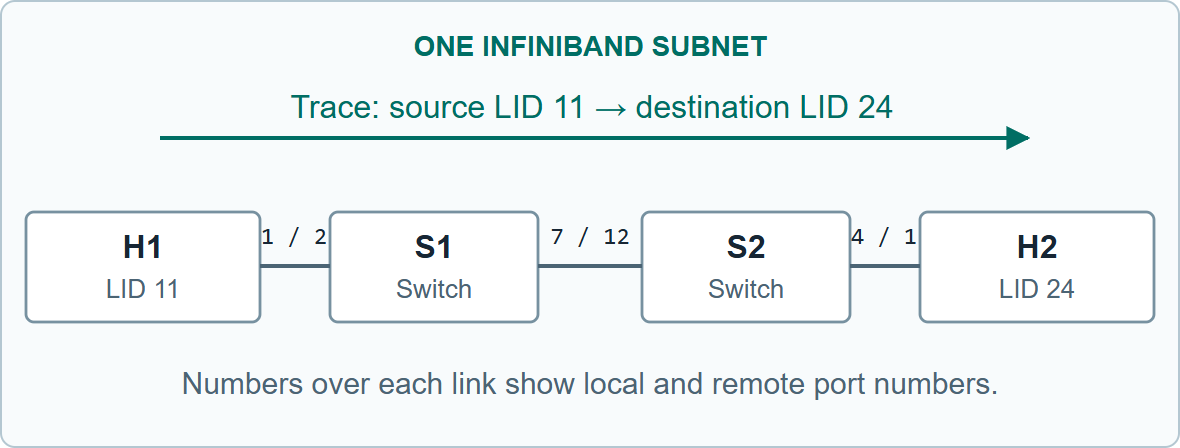
Start with the HCA the workload uses
Run ibstat on both hosts and match the device and port to the workload configuration. On a dual-port adapter it is easy to read the healthy port while the workload is bound to the other one. Record the port GUID as well as the base LID. The GUID helps you recognize the port after a move if the subnet manager assigns a different LID.
ibstatFor this lab the expected base LIDs are 0x000b and 0x0018. Some tools display those in decimal as 11 and 24. If H2 is still in Initializing, start with subnet-manager visibility. A physical link can be up before the subnet manager has finished configuring the port. There is little value in tracing a path to an endpoint that has yet to come up.
Trace in both directions
From a management host on the fabric, use ibnetdiscover to establish which ports are actually connected, then run the two traces. On a machine attached to more than one fabric, select the intended local HCA and port using -C and -P. Run with the fabric-management permissions required by your site.
ibnetdiscover
ibtracert 11 24
ibtracert 24 11
A healthy forward trace goes through S1 and leaves on port 7. It enters S2 on port 12 and leaves on port 4. Compare the return path independently. A working return trace is useful evidence even if the forward trace still fails.
Open the table at the last switch you reached
Suppose both hosts are Active and discovery still sees all three links, but the forward trace ends at S2. Query the linear forwarding table for destination LID 24 on both switches. In this lab their management LIDs are 3 and 4.
ibroute 3 24 24
ibroute 4 24 24
Expect S1 to send LID 24 to port 7 and S2 to send it to port 4. If S2 still points to a different port, compare its observed topology with the active subnet manager’s view before changing a switch or moving a cable again. If S2 points to port 4 already, check the far-end GUID and link counters on that connection. A forwarding entry can be correct while the physical link is suffering errors.
Repeat both traces when the fabric stabilizes and test the original workload using the original device and port. A management trace can prove the switch path is there while an application still fails because of partition membership, the selected GID, or another endpoint setting. The LIDs in these examples also stop at the subnet boundary. For a remote InfiniBand subnet, identify the endpoint by GID and investigate the routed path separately.
References: NVIDIA InfiniBand Fabric Utilities and the upstream ibtracert implementation and usage.